This month I thought I would write about Microsoft Word. Okay, that
sounds like a pretty tedious post, right? How does a reflection on a
word processing programme help Christian writers in their lives of faith
and writing? It’s just a computer programme, yes? Just a glorified
typewriter?
Well…no, actually, and I want to wax a little bit
freely on its wondrousness, if you’ll allow. And also its little
annoyances, of course, which we all come across from time to time. When
the formatting goes askew and you Just. Can’t. Delete. That. Section.
Break. When it does weird things like jump to the end of your 90,000
word novel when you’re editing for no good reason. When tabs break it
(please, please never use tab indents. They are indeed the work of satan
and cause formatting horrors that poor formatters like me have mini
tantrums over.) When you can’t get the table of contents to behave, when
tables and illustrations make you tear your hair out, and the worst of
all: page numbers. Why do those little lines appear in the header and
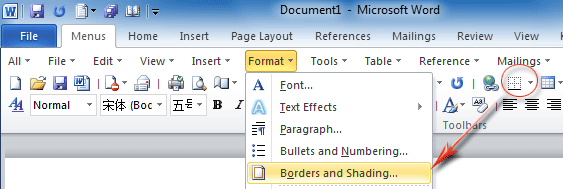
footer when all you want is an innocuous little number? (Hint: go into
the ‘borders and shading’ drop down next to the paragraphs group on the
home tab and select ‘none’, repeatedly in the headers and footers the
line of doom appears in until it’s gone.)
mysteries to MS Word, there are depths of it even the most experienced
users do not plunder (all those buttons on all those tabs!) But I am
writing this post in praise and honour of it (and other open source
programmes like it) because it has revolutionised our lives as authors,
hasn’t it?
Think back to a few decades ago (if you’re old like
me) when you used your dad’s old typewriter to bang out your college
assignments and that secret book you wrote but never showed a soul (that
one is still in my drawer and is very…well, eighties.) Maybe you
moved onto an electronic typewriter, maybe even one of those ones with a
tiny screen where you could type a line or a few lines at a time and
edit those as you go – it was a revolution! And then, of course, came
computers, with a very early word processing programme called Word
Perfect. Oh, how I loved that programme, what a revelation it was. It
was the programme that set me on a course of falling a little bit in
love with technology and, eventually, with Word itself.
Now, Word
is not Perfect (see what I did there?) but it is flipping brilliant. So
today I thought I’d offer a few pointers on some good ways to make use
of it when formatting a book, and I also thought I would express my
thanks to God for it and others like it. How amazing is it that we are
created with such marvellous brains that we can come up with something
like a computer? Sometimes I just sit back and marvel at how far we have
come. How clever is God? I’m so grateful we have these tools at our
fingertips, and that these tools can get our words – and God’s words – out to the world. I’d
also like to mention Scrivener at this point, which I love and adore
and use for the process of creating my books (maybe that’s another
post?) But Word is the one I use to ready them for the world, so here’s
my (by no means comprehensive) list of things to do in Word:
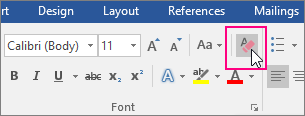
1. If you’re starting from a document that’s already written and you want
to format it, click the clear all formatting icon on the home ribbon. It
will get rid of most of the odd formatting that can creep into any
document.
first place – see above!) You can indent using the ruler, but even
better….
3. Learn and make use of the Word Styles
functionality. I am a complete convert; it has revolutionised the way I
use Word and is a must if you’re going to format books regularly. Once
you’re up and running with them, you can save templates to paste new
books into and you’re halfway there very quickly with your formatting. I
haven’t got time here to go into how – I could always write a post on
that, if people would like? Suffice to say – they are good. They make
formatting easier. They make the document look better. They make the
contents easier to build.
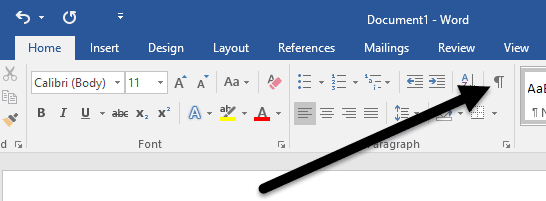
4. Use the ‘show formatting’ button
lots. Often when formatting others’ work, I have a look behind the
scenes with this button so I can find any odd spaces, page breaks etc
that are causing havoc. It’s a great little tool and often shows up
what’s going wrong (why can’t you type in that space? Why is Word
jumping to a new page halfway through a previous one? And all of that
palava.)
6. Don’t use page numbers if you’re preparing a book for Kindle – they are not needed and just mess up the formatting.
It is possible to place images in Word, but it’s not always easy to get
them where you want. Learn the image placements options. ‘In line with
text’ is good but will behave oddly when you want to move it around.
Often the ‘place bottom middle, top left’ etc options are a better fit.
Don’t give up!
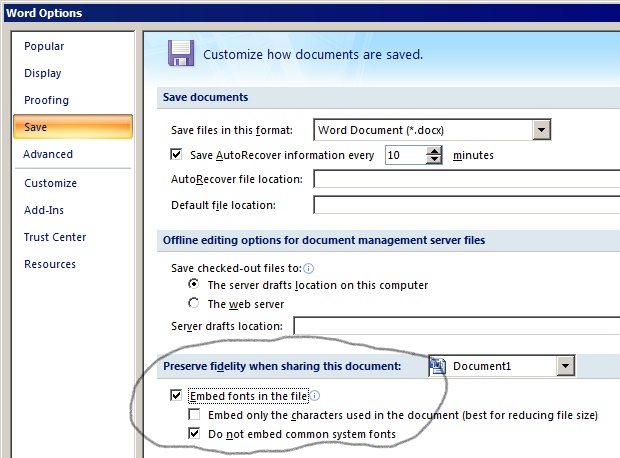
9. When formatting for publication, embed your
fonts in the PDF. You might think PDFs keep the fonts you use, but it
might not, especially if it’s not a common font. Go into file — options
— save — embed fonts in file and tick that.
yourself in too much of a flap when things go wrong (I speak to myself
here.) Usually a quick Google will sort out the problem; if not, ask on
the ACW FB page and I’m sure someone will have an idea to help.
So
that’s it – well, not all of it, but a little, and I hope it helps and
inspires a little, too. Mostly I want to express my gratitude for Word
and programmes like it, programmes that have brought us further than we
ever dreamed of when we were rattling away on that old typewriter and
deploying the Tippex with slightly light-headed abandon back in the eighties. Thank you,
Jesus, the great Word above all other words, for MS Word.
My ode to Word (in limerick form)
There once was a programme called Word
The best thing of which we have heard
It checks all our spellings
And gets us all yelling
When its moves are just plainly absurd.
It loves to impress with its styles
As it tidies up all of our files
We love it for typing
But pray please, not wiping
It can cause us much heartache and trials.
Are you ready for people to look?
It’ll get there by hook or by crook
Your friends will be reading
Those publishers pleading
For your Word-crafted, fabulous book.