
Ever had a wonderful idea for your story, or the most amazing turn of
phrase, while you’re doing something else and are quite unable to write
it down? You’re sure you’ll remember it, but you never do.
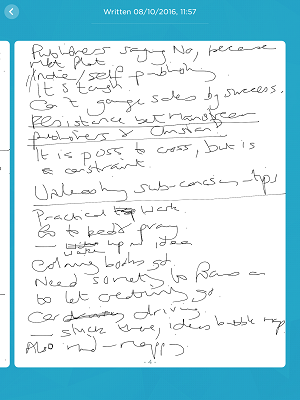
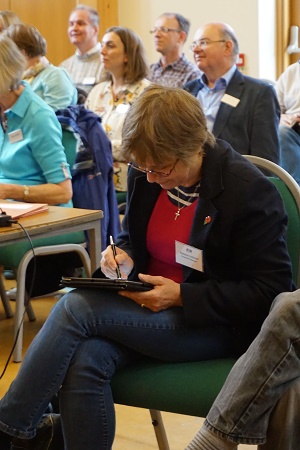 Amy Boucher Pye, one of our two presenters at the ACW Writers’ Day last weekend, spoke about the need to get in touch with the subconscious. She suggests doing practical things, like driving the car, gardening and housework, thereby allowing our brains to focus on something else so as to let our creativity unleash itself. Amy records the ideas that come to her as sound files on her phone, but, although I also practise the ‘doing something else’ technique too, I prefer writing to speaking. I’ve attempted using the old fashioned media, but my notebook is never to hand and I always lose the bits of scrap paper I press into service as alternatives. In my last post, I described how I created notes on Evernote on my phone but typing with one finger has proved slow and awkward and the results subject to the vagaries of autocorrect for Apple products. I recently informed my son, in a hastily composed text, that I was costing bidets in Ostend.
Although I can touch-type very fast on a computer keyboard, for me, when making notes, nothing beats handwriting. So,
I’ve downloaded, on to my iPad, Evernote Penultimate, a free handwriting application. You can write with your finger, as the software responds to touch, but I bought a stylus priced just £18. I needed a bit of practice in using Penultimate, as the stylus tip is a rubber pad, about the size and shape of a rubber on the end of a pencil (see to the left) and – like all too many apps – no tutorial is provided. What I had to work out for myself is that, before you can make any mark on the screen, you have to select a pen type from the options available. A rubber tool is available, also undo and a colour menu. As you get to the end of the page, you tap the right-facing arrow at the bottom of the screen to call up another page in the same file. When I began, my handwriting was a spidery scrawl, and it hasn’t improved much over the ten days – see above my notes from Amy Boucher Pye’s talk. However, I can write very quickly and read back what I’ve written (even if other people can’t). Penultimate also provides manuscript pages on which musicians can handwrite scores. Notes can be stored in folders in Evernote itself or other applications, and be tagged, so they can be found easily. The handwritten content, however, is not itself searchable.

installed. This is a very new feature. Just press the squiggle icon at the bottom of the Notes menu.
Job wrote “Oh that my words were written! Oh, that they were inscribed in a book! That with an iron stylus and lead. They were engraved in the rock forever! (Job 19:23-24) We all know how he felt.

